Contents
Google OAuthとは
「Google でログイン」
↓
「複数アカウントから選択」
↓
GIS は OAuth フローをトリガーし、ユーザーの代わりにデータアクセス用のトークンを返します。


例)
フロント
↓
app\Http\Controllers\Api\GoogleAuthController.php
↓
レスポンスでURL
概要 | Web guides | Google for Developers
導入手順
Google Cloud Consoleでプロジェクト作成
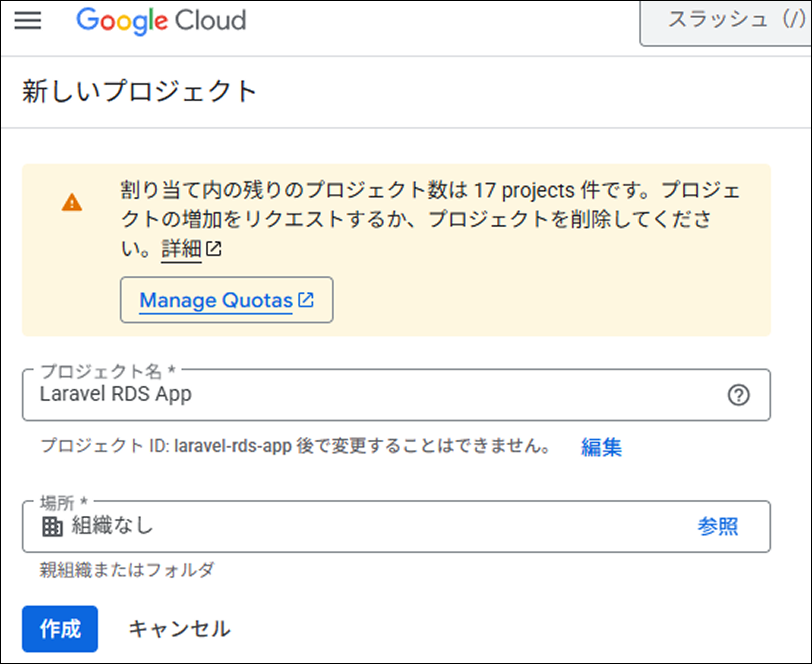
「API とサービス」→「OAuth 同意画面」をクリック
User Type を選択
「外部」 を選択(テストユーザーを追加できます)
「作成」をクリック
アプリ情報を入力
以下の必須項目を入力してください
アプリ名:Laravel RDS App(または任意の名前)
ユーザーサポートメール:あなたのメールアドレスを選択
アプリのロゴ:スキップ(任意)
アプリドメイン:すべてスキップ(任意)
デベロッパーの連絡先情報:あなたのメールアドレスを入力
「保存して次へ」をクリック
OAuth 認証情報の作成
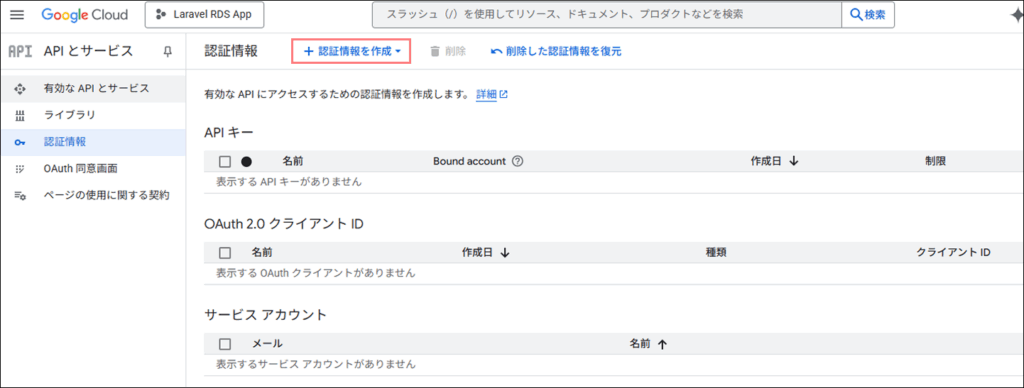
左側のメニューから「API とサービス」→「認証情報」をクリック
上部の「+ 認証情報を作成」をクリック
「OAuth クライアント ID」を選択
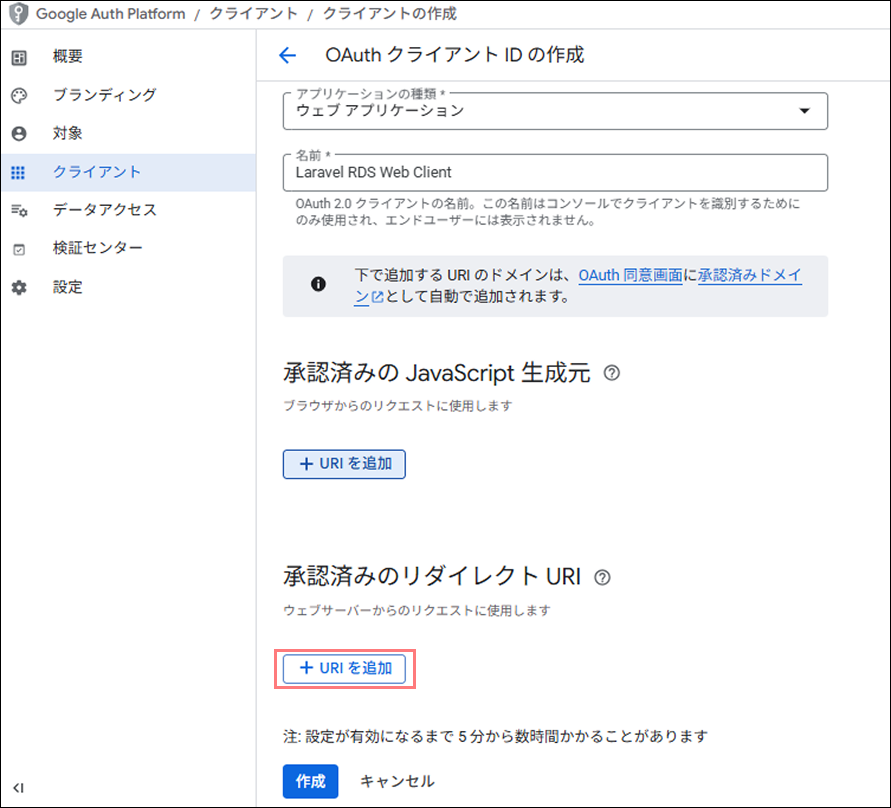
アプリケーションの種類:「ウェブ アプリケーション」 を選択
名前:Laravel RDS Web Client(または任意の名前)
承認済みのリダイレクト URI を追加
開発環境用:http://localhost:5173/auth/google/callback ← Vue のルート
IPアドレスで設定すると「無効なリダイレクト: 末尾はパブリック トップレベル ドメイン(.com、.org など)にする必要があります。」とエラーが出ました
→IPアドレスでなくてドメインを指定する必要があるようです
「作成」をクリックしてみてください。
クライアント ID とシークレットが表示されたら、それをコピー
本番環境(AWS Lightsail)で Google OAuth ログインを使えるようにする
現状の問題
Google OAuth は IP アドレス(54.178.81.51)では使えない → ドメイン名が必要
解決策
Vue(フロントエンド)にドメインを割り当てる
ネームサーバーでの設定
どのサービス会社で設定すればいいか、わかりづらいですが、ネームサーバーを管理しているサービスになります
例えばムームードメインでドメインを取得して「ネームサーバー = XServer」と設定していればXServerでの設定になります。
具体例
ドメイン取得(ムームードメイン)
    ↓
ネームサーバー設定
「XServer で DNS を管理する」
    ↓
DNS レコード設定(XServer で)
app.bizlabo.site → 54.178.81.51
    ↓
ユーザーが app.bizlabo.site にアクセス
    ↓
54.178.81.51(Lightsail)に接続
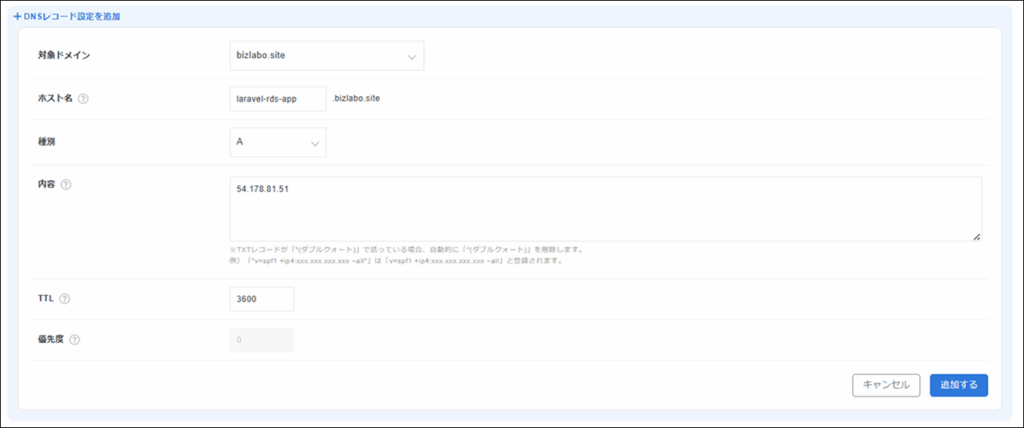
XServer の DNS レコード追加
ホスト名:laravel-rds-app
種別:A
内容(値):54.178.81.51
TTL:デフォルト(通常3600秒)
公開しているサーバーの設定
ubuntu@ip-172-26-6-105:/var/www/vue$ cat /etc/nginx/sites-available/vue
server { listen 8080; server_name laravel-rds-app.bizlabo.site;

    root /var/www/vue; index index.html;

    location / { try_files $uri $uri/ /index.html;
    }
}
# 旧設定(IPアドレス直接アクセス用)
server { listen 8080; server_name 54.178.81.51;

    root /var/www/vue; index index.html;

    location / { try_files $uri $uri/ /index.html;
    }
}
sudo nginx -t
sudo systemctl restart nginx動作確認するとポップアップウィンドウ(真っ白な画面)に
コンソールで見てみると
fetch('http://54.178.81.51/api/auth/google/callback' + window.location.search)
  .then(res => res.json())
  .then(data => console.log(data))
  .catch(err => console.error(err))

↓

Mixed Content: The page at 'https://accounts.google.com/...'
was loaded over HTTPS, but requested an insecure resource
'http://54.178.81.51/api/auth/google/callback...'.
This request has been blocked; the content must be served over HTTPS.
Google の認証画面は HTTPS ですが、Laravel API は HTTP なので、ブラウザがブロックしています。
Certbot をインストール
Lightsail にSSH接続して、以下のコマンドを実行
# snapd をインストール(Certbot に必要)
sudo apt update
sudo apt install snapd -y

# snapd を最新化
sudo snap install core
sudo snap refresh core

# Certbot をインストール
sudo snap install --classic certbot

# certbot コマンドを使えるようにする
sudo ln -s /snap/bin/certbot /usr/bin/certbot
ubuntu@ip-172-26-6-105:~$ sudo certbot --nginx -d laravel-rds-app.bizlabo.site
Saving debug log to /var/log/letsencrypt/letsencrypt.log
Enter email address or hit Enter to skip.
(Enter 'c' to cancel): 10121012tt@gmail.com
- - - - - - - - - - - - - - - - - - - - - - - - - - - - - - - - - - - - - - - -
Please read the Terms of Service at:
You must agree in order to register with the ACME server. Do you agree?
- - - - - - - - - - - - - - - - - - - - - - - - - - - - - - - - - - - - - - - -
(Y)es/(N)o: y
- - - - - - - - - - - - - - - - - - - - - - - - - - - - - - - - - - - - - - - -
Would you be willing, once your first certificate is successfully issued, to
share your email address with the Electronic Frontier Foundation, a founding
partner of the Let's Encrypt project and the non-profit organization that
develops Certbot? We'd like to send you email about our work encrypting the web,
EFF news, campaigns, and ways to support digital freedom.
- - - - - - - - - - - - - - - - - - - - - - - - - - - - - - - - - - - - - - - -
(Y)es/(N)o: n
Account registered.
Requesting a certificate for laravel-rds-app.bizlabo.site
Successfully received certificate.
Certificate is saved at: /etc/letsencrypt/live/laravel-rds-app.bizlabo.site/fullchain.pem
Key is saved at: /etc/letsencrypt/live/laravel-rds-app.bizlabo.site/privkey.pem
This certificate expires on 2026-02-16.
These files will be updated when the certificate renews.
Certbot has set up a scheduled task to automatically renew this certificate in the background.
Deploying certificate
Successfully deployed certificate for laravel-rds-app.bizlabo.site to /etc/nginx/sites-enabled/vue
Congratulations! You have successfully enabled HTTPS on https://laravel-rds-app.bizlabo.site
- - - - - - - - - - - - - - - - - - - - - - - - - - - - - - - - - - - - - - - -
If you like Certbot, please consider supporting our work by:
* Donating to ISRG / Let's Encrypt: https://letsencrypt.org/donate
* Donating to EFF: https://eff.org/donate-le
- - - - - - - - - - - - - - - - - - - - - - - - - - - - - - - - - - - - - - - -
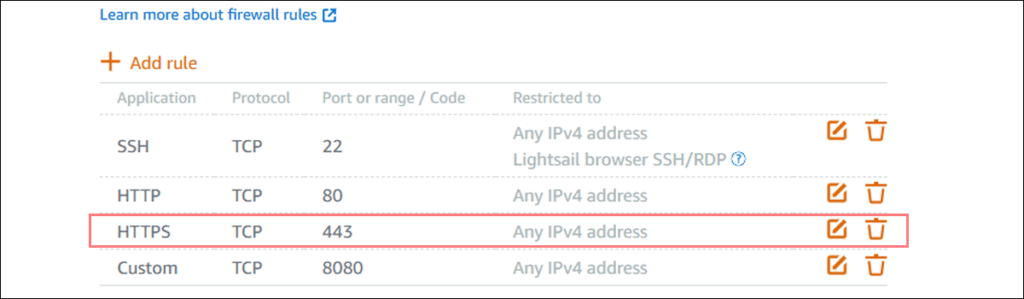
ubuntu@ip-172-26-6-105:~$ AWS Lightsail でポート443を開放